

ImportantThis post contains advertising.
The TomTom Trucker 6000 was provided to me free of charge for the duration of this test. The following article reflects exclusively my personal and independent opinion.
NoteHistorical Post
This review was originally published in 2015 and has been technically and linguistically revised for ChristiansBlog. The described functions correspond to the state of technology at that time.
Four Weeks of Practical Testing
After I had already had the opportunity to thoroughly test the Becker transit.6 LMU, I was given the chance shortly thereafter to also test the new TomTom Trucker 6000 in my professional daily routine.
As with all product tests on ChristiansBlog, the manufacturer had no influence on the content of this article here either. All impressions are based exclusively on my personal experiences during the test period.
The TomTom Trucker 6000 was specifically developed for professional drivers and is intended to facilitate daily work with current traffic information, navigation tailored specifically for trucks, and various comfort functions.
In contrast to the previous comparison test with two devices, I consciously decided this time not to drive permanently with a reference device. After all, hardly anyone uses two navigation devices simultaneously in everyday life. Instead, the TomTom Trucker 6000 had to prove itself solely in daily use.
First Impression
Even upon unpacking, the TomTom Trucker 6000 makes a high-quality impression. The housing feels solidly built, and the large display is easy to read even from inside the cab.
The initial setup is straightforward. Vehicle data such as height, width, length, total weight, or axle loads can be entered quickly, so that navigation is aligned with your own vehicle from the start.
I was particularly impressed by how clearly the menu structure was designed. Many functions are accessible with just a few finger taps and do not require a long learning curve.
The mount also left a solid impression. The device could be easily attached to the windshield and sat securely in its place throughout the entire test period.
Following the setup, there was first a map update and software update. After that, the device was ready for everyday use.
Route Calculation and Navigation
Throughout the entire test period, I consciously refrained from using a second navigation device for comparison. After all, hardly anyone drives permanently with two navs around in everyday life. Therefore, the TomTom Trucker 6000 had to prove itself exclusively in practical application.
With its 6-inch display, the device is barely noticeable on the windshield. Compared to the Becker transit.6 LMU, the display is only 0.2 inches smaller – a difference that practically doesn’t matter in everyday use.
What quickly stands out, however: TomTom follows a different philosophy than many competitors. While other truck navigation devices display numerous additional information such as height restrictions, overtaking bans, or access prohibitions directly on the map, TomTom opts for a much cleaner presentation.
Personally, I missed this information. Especially in trucks, hints about bridge heights or access prohibitions can be valuable additional orientation aids.
In terms of price, the TomTom Trucker 6000 was at a similar level to the Becker transit.6 LMU at that time. The recommended retail price was around 399 euros, but online it was already available for about 349 euros in some cases.
Contents
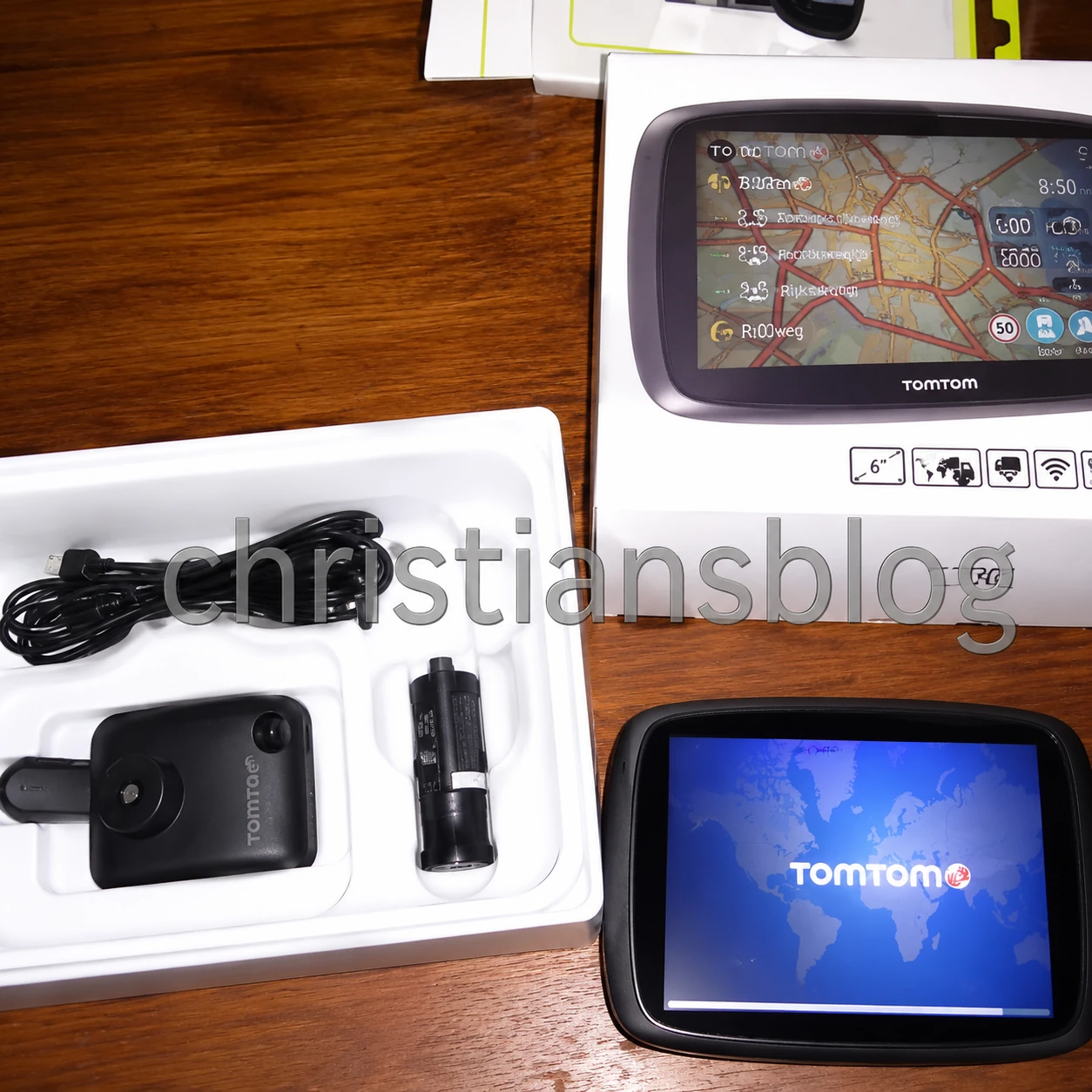
The contents of the package made a good impression overall. Alongside the navigation device, all necessary cables and the mount were included in the box.
Only a plastic plate for mounting on the dashboard was missing from my test unit. Since it was already a circulating test unit, I assume that this was lost by one of the previous testers.
TomTom Traffic Instead of TMC
TomTom takes a completely different approach to traffic information.
The TomTom Trucker 6000 completely dispenses with a classic TMC receiver. Instead, the manufacturer relies on TomTom Traffic. Current traffic data is received via a SIM card integrated in the device. This eliminates the need for a connection to a smartphone or a Wi-Fi hotspot.
This worked reliably and comfortably during my test.
However, there is a catch.
The service was free only for one year. After that – at least according to the standards at that time – annual costs of around 50 to 60 euros per device would apply.
Especially for freight companies with multiple vehicles, this can result in significant follow-up costs.
Vehicle Profiles
On the other hand, I liked very much the option to quickly adjust vehicle data before every trip.
Weight, hazardous materials, or other vehicle-relevant details can be changed easily.
Especially the actual total weight can vary in everyday life. This allows routes to be used that are only open for vehicles under a certain weight limit.
While the Becker also offers a comparable function, it must be accessed via the menu there. With the TomTom, you are asked about this directly before every new navigation.
I found this solution to be significantly more practical.
Alternative Routes
During navigation, the TomTom Trucker 6000 regularly searches for faster alternative routes and suggests them automatically.
In principle, this function is sensible. However, I would have wished that the device weighed a bit more carefully when a new route actually brings an advantage.
Not infrequently, I received suggestions that promised merely two or three minutes of time savings. In my opinion, it would have been more sensible to offer alternative routes only when they saved at least ten or fifteen minutes.
Even more critical was the fact that some of these alternative routes were simply unsuitable for a 40-tonner truck.
More than once, the navigation device tried to lead me through narrow residential areas where even larger vans would have had difficulty maneuvering.
Drivers unfamiliar with an area often rely heavily on their navigation device. Therefore, suggested alternative routes should not only be faster but also genuinely suitable for the selected vehicle profile.
Company Entrances and Geocoordinates
One point I had already highlighted positively about Becker was the ability to comfortably enter geocoordinates.
Especially in freight transport, the delivery address and the actual truck entrance often do not match. The delivery is frequently located on the rear side of a business premises or in another street.
I would have also wished for a simpler solution with TomTom here. While it is possible to cancel an active route and enter a new destination, the path to get there feels unnecessarily cumbersome.
Missing Additional Information
It became apparent right at the beginning of the test that TomTom deliberately omits many additional pieces of information.
While truck restrictions are taken into account during route calculation, corresponding indications are missing on the actual map view.
These include, for example:
- Driving bans
- Overtaking prohibitions
- Height restrictions
- Other traffic-relevant notices
Such information can provide useful support, especially when traffic signs are hard to read.
As an example, during the test I noticed that the Leverkusener Bridge, which was closed to trucks at the time, was taken into account in the route calculation. However, on the map itself, only a speed camera symbol could be seen; there was no clear indication of the closure.
Lifetime Map Updates
Like many manufacturers, TomTom also advertised lifetime map updates.
Upon closer inspection, however, it becomes clear that “lifetime” does not necessarily mean that map updates are available indefinitely.
TomTom defines the lifespan rather as the period during which the respective device is still officially supported. As soon as this support is discontinued, the free map updates also end.
This approach is understandable and is handled similarly by many manufacturers; however, one should be aware of what is actually meant by the term “lifetime.”
For a navigation device in this price class, I consider regular map updates to be a matter of course.
Voice Guidance
In a navigation device for professional use, voice guidance plays a crucial role. In a truck, and indeed, the driver’s gaze should remain on the road as much as possible. The clearer the announcements, the less often one needs to look at the display.
The voice announcements of the TomTom Trucker 6000 are generally easy to understand and are issued in good time. Direction changes are announced early enough so that there is sufficient time to prepare for the next turn.
Nevertheless, during the course of the test, I noticed that the announcements were often quite general. In complex intersection areas or industrial districts, I would have wished for more detailed instructions at some points.
Street names are also not always announced. Instead, the device frequently limits itself to instructions such as “Turn right now” or “Follow the road.” While this works without problems in most situations, it offers less orientation than navigation devices that additionally name street names or prominent landmarks.
Voice Control
The TomTom Trucker 6000 features voice control with which various functions can be operated without touching the display.
The idea behind this is fundamentally good. After all, the driver should be distracted from traffic events as little as possible.
However, in everyday use, it became apparent that the voice control did not always work reliably. Some commands were recognized immediately, while others I had to repeat several times, even though they were spoken clearly.
Of course, during driving, the soundscape inside the cab and engine noises also play a role. Nevertheless, I would have wished for a higher recognition rate.
Ultimately, I therefore resorted more often directly to the touchscreen, because the desired destination could often be entered faster that way.
Speed Camera Warning
Another feature of the TomTom Trucker 6000 was the display of known stationary speed measurement installations.
The warnings were issued in good time and reliably. Anyone who wishes to use this function receives an additional notice on known measurement sites.
Regardless, every road user should naturally adhere to the applicable speed limits. A navigation device replaces neither attention nor defensive driving.
Everyday Operation
In daily use, the TomTom Trucker 6000 left a generally good impression overall.
The display responded reliably to inputs and could be operated quickly even during short stops. The menu structure was logically organized, so most functions were accessible without lengthy searching.
Additionally, the smooth map display was positive. Zooming, panning, or recalculating a route occurred without noticeable delays.
Calculating new routes after a missed departure also worked quickly; typically, a new route was available within just a few seconds.
This demonstrated that TomTom had accumulated extensive experience in the field of navigation over many years. The software appeared mature and stable overall.
Minor Weaknesses in Daily Use
Where there is light, there are also shadows.
Throughout the test, I encountered situations repeatedly where I could not follow the navigation device’s decisions.
Sometimes, roads were preferred that, while technically passable for a tractor-trailer, seemed impractical in practice. Narrow town routes or narrow side streets often cost more time and patience than they actually saved.
Experienced professional drivers gradually develop a sense of which roads are suitable for heavy vehicles and which should be avoided. I would have wished that TomTom had taken these experiences into account more strongly and adopted a more conservative approach when selecting routes.
Of course, no navigation device can know every local peculiarity. However, suggested routes should not only be legal but also as practical as possible.
Conclusion
After four weeks of daily use, the TomTom Trucker 6000 left me with an overall positive impression.
What particularly convinced me were the simple operation, smooth menu navigation, and fast route calculation. TomTom Traffic also functioned reliably throughout the entire test period, ensuring that traffic jams were detected early and bypassed when necessary.
Equally successful was the ability to quickly adjust vehicle data. This feature is extremely practical in daily life, especially in freight transport, where weight or vehicle configuration can change regularly.
On the other hand, there were also some points where I would have clearly preferred more practical relevance.
For instance, important additional information such as height restrictions or other traffic signs relevant for trucks was missing from the map view. Additionally, some suggested alternative routes led through roads that were theoretically passable but seemed unsuitable for a tractor-trailer in practice.
Even the voice control could not fully convince me. While it worked in principle, it did not always recognize commands reliably. In many situations, operating via the touchscreen was ultimately faster.
These criticisms do not change the fact that the TomTom Trucker 6000 is overall a powerful navigation device. Many weaknesses could be addressed or at least improved through software updates.
My Personal Verdict
Would I decide today between the Becker transit.6 LMU and the TomTom Trucker 6000?
To be honest: That’s not easy.
Both devices follow different concepts.
In my view, Becker scored with a very information-rich map display and numerous additional hints specifically for professional drivers.
TomTom, on the other hand, focused more on a clean user interface, simple operation, and the excellent live traffic service at the time.
Which device is ultimately better therefore also depends on the driver’s personal preferences.
I myself would have wished for a combination of both worlds: Becker’s extensive truck information combined with TomTom’s excellent traffic data and smooth operation.
Such a navigation device would have been almost perfect for me back then.
Final Words
In conclusion, I would like to thank TomTom sincerely for providing the Trucker 6000 for this detailed practical test.
I also thank all readers who have followed my product tests for many years and contributed to an interesting exchange through their comments, questions, and personal experiences.
I hope that this experience report could provide helpful orientation for all professional drivers in their decision for or against a specific navigation device.
As with every product test, the same applies here:
Not every device suits every driver.
Ultimately, what matters is which functions are truly needed in your personal workday.
I wish you safe travels and always reach your destination safely.
Note on Republishing
This test report originally appeared in 2015 on ChristiansBlog and was revised as part of the archiving for today’s Hugo system.
The content was intentionally not adapted to current technology. Statements regarding map material, software versions, live services, or prices reflect the state of technology at the time and serve as a historical experience report by a professional driver.