

What are RSS Feeds?
RSS feeds can essentially be thought of as a live ticker. These feeds inform you about new content on a website without requiring you to visit the website constantly.
Usually, you need an RSS reader for this.
If you have installed a Matrix client, you can skip that step. Because Matrix already comes with an RSS reader built-in.
Using Matrix as an RSS Reader
I describe how to use Matrix as an RSS reader in the Schildi Desktop Client :
- Create a new, unencrypted room.
- Enter the room.
- Click on the Info icon at the top right of the room.
- In the window that opens, click Add Widgets, Bridges, and Bots.
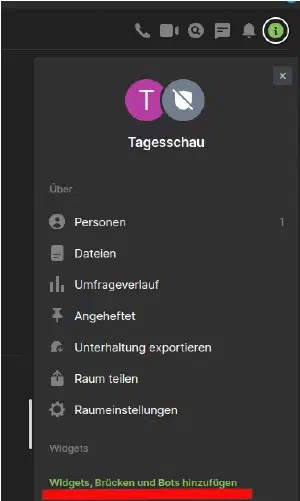

All the things you can add to the room will then appear there.

Here, we select Feeds under Bots and click Add in the next window.
Here you can specify which RSS feed you want to subscribe to. Go to the desired page and search for the link to the RSS feed. On some sites it is hidden; on others, it is not shown at all.
If it is a WordPress site, the URL is usually https://example.org/feed/

Then click Subscribe and you are done.
Until the feeds appear in the created room, it takes a little while, about 1 - 3 hours, but it can also happen faster.
In Conclusion
Now you know what an RSS feed is and how to integrate it into your Matrix client.