
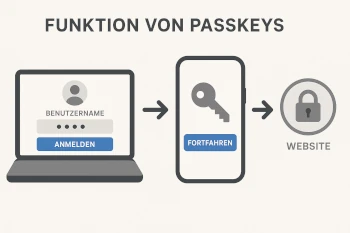
What are Passkeys?
Passkeys are a new, secure way to sign in to websites or apps – without a password. You no longer need to remember a complicated password. Instead, you use your fingerprint, facial recognition, or a device PIN.
How do Passkeys work?
A passkey consists of two parts: a public key and a private key.
- The public key is stored on the website where you register.
- The private key remains securely on your own device, such as a smartphone or laptop.
Only the private key can be used to sign in later. The private key never leaves the device and cannot be stolen or shared.
What is required?
To use passkeys, you need:
- a modern smartphone, tablet, or computer
- a secure method for unlocking (e.g., fingerprint, facial recognition, or PIN)
- an up-to-date browser (e.g., Chrome, Firefox, Safari)
Benefits of Passkeys
- Increased security because there is no password that can be stolen
- Protection against phishing, as passkeys cannot be transferred to other websites
- No need to remember or type in a password
- Synchronization with other devices possible via Google, Apple, or Microsoft if desired
Example: Signing in with a Passkey
- You register on a website that supports passkeys.
- The device asks for confirmation – for example, via fingerprint or facial recognition.
- A passkey is created.
- For the next login, the same confirmation is sufficient – the password is no longer needed.
Where can Passkeys be used?
More and more services offer sign-in via passkey. This includes, for example:
- Google accounts
- Apple/iCloud
- Microsoft services
- PayPal
- Other websites with “Sign in without a password”
Conclusion
Passkeys are a secure and convenient way to sign in online. They make passwords obsolete while simultaneously offering better protection against fraud and theft.
If your device supports passkeys, it is worth trying them out once.