Extract and Translate PDF under Linux
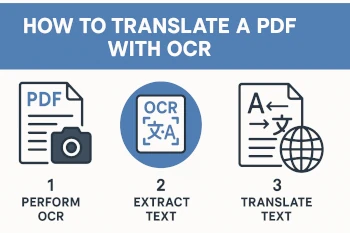
This tutorial shows how to convert a PDF document (e.g., a French PDF) into searchable text using open-source tools on a Linux system and then translate it into German.
Prerequisites
- Linux system (Debian, LMDE, or any other distribution)
- Terminal access
- Installation of the following packages:
ocrmypdfpoppler-utilstesseract-ocr-fra(French language for OCR)tesseract-ocr-deu(German language, if needed for OCR)translate-shell(for machine translation)- Optional:
po4aand gettext tools for PO/POT workflow
1. Check if text can be directly extracted from the PDF
Open the PDF with a PDF reader (e.g., Evince, Okular) and try to select and copy text.
If it works: Extract text directly
pdftotext input.pdf dokument.txtIf not (scanned PDF without text), proceed with OCR.
2. Run OCR on the PDF
OCR generates invisible text in the PDF that is searchable and extractable.
ocrmypdf -l fra input.pdf output_ocr.pdf
Explanation:
-l fraindicates that the texts are in French (OCR language)input.pdfis your original PDFoutput_ocr.pdfis the new file with an embedded text layer
3. Extract text from the OCR PDF
Now you can extract the recognized text:
pdftotext output_ocr.pdf dokument.txt
The file dokument.txt contains the pure French text.
4. Machine translate the text into German
Translate the text using translate-shell:
trans -b :de -i dokument.txt -o dokument_de.txt
Parameters:
-b: “Brief mode” (translates only the text, no additional info):de: Target language German-i: Input file (here French text)-o: Output file (German translation)
5. Optional: Professional PO/POT workflow with po4a
For larger projects or better management, you can proceed as follows:
a) Create POT file from text
po4a-gettextize -f text -m dokument.txt -p dokument.pot
b) Create PO file for German
msginit --input=dokument.pot --locale=de --output=dokument-de.po
c) Edit .po file
Open dokument-de.po with a text editor or a tool like Poedit
.
d) Transfer translation back to text format
po4a-translate -f text -m dokument.txt -p dokument-de.po -l dokument_de.txt
Summary of all commands
1. Install packages
sudo apt update
sudo apt install ocrmypdf poppler-utils tesseract-ocr-fra tesseract-ocr-deu translate-shell po4a gettext
2. Create OCR PDF (for scanned PDF)
ocrmypdf -l fra input.pdf output_ocr.pdf
3. Extract text from OCR PDF
pdftotext output_ocr.pdf dokument.txt
4. Translate text into German
trans -b :de -i dokument.txt -o dokument_de.txt
Optional: PO workflow
po4a-gettextize -f text -m dokument.txt -p dokument.pot msginit --input=dokument.pot --locale=de --output=dokument-de.po
Edit PO file…
po4a-translate -f text -m dokument.txt -p dokument-de.po -l dokument_de.txt
Notes
- OCR and translation quality may vary depending on the document.
- Locally installed solutions are preferred, especially for sensitive data.
- For GUI-based OCR, you can install and use
gscan2pdf. - The procedure is the same for all languages. For OCR, the respective language must be installed from which you want to translate.
Good luck with translating your PDF document!