
What is Matrix and Element?
Matrix is an open communication network, similar to WhatsApp, Signal, or Telegram. The big difference: Matrix is decentralized. This means it does not belong to a single company, and anyone can operate their own server or register with existing ones. This makes the platform more flexible, independent, and privacy-friendly.
Element is the most popular app for using Matrix. It enables:
- Text messages
- Voice messages
- File and media sharing
- Video and voice calls
- Threads and Spaces
- Receiving RSS feeds
If you already use WhatsApp, you will find yourself at home quickly. The key advantage: you retain control over your data.
Tip: Those who value privacy can also directly use their own Matrix server or choose a smaller, private server.
Why Matrix is a strong WhatsApp alternative
Matrix offers some features that classic messengers do not have:
- Decentralization: No single provider has full control over your account or chats.
- End-to-end encryption: Available by default for private chats and groups.
- Threads: Discussions in group chats can be cleanly separated – so you never lose track.
- Spaces: Create your own areas for family, friends, projects, or hobbies and collect individual chat rooms within them.
- Platform-independent: Apps for smartphone, desktop, or browser.
Caution: Unlike WhatsApp, sometimes a bit more configuration is required in Matrix – in return, you get more freedom and security.
Step-by-step: Create a Matrix account
1. Choose a server
Before creating your Matrix account, you must choose a Matrix server. By default, the Element app cannot create an account without a server.
- Visit joinmatrix.org
- There you will find a list of public Matrix servers
- Choose a server, e.g.,
matrix.orgor a smaller, private server
Tip: If you want maximum privacy, choose a smaller server or set up your own server.
2. Create an account on the server website
- Go to the website of the chosen server (e.g.,
https://matrix.org) - Click Register / Sign Up
- Choose a username (e.g.,
@deinname:matrix.org) - Enter an email address (optional, but recommended)
- Set a secure password
- Confirm registration via email if required
Caution: Without this registration, you cannot log in to the Element app later. The account is created on the server.
3. Install and log in to Element
- Smartphone:
- Google Play Store or
- F-Droid (Google-free, privacy-friendly)
- Desktop: Download Element Desktop
- Browser: Directly at app.element.io
After installation:
- Open Element
- Choose Log in
- Enter the server and your credentials that you created on the server website
- Now you can use Matrix, start chats, create threads, and set up Spaces
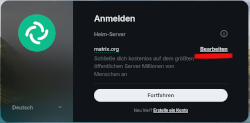 The login is uniform and the same everywhere when using Element:
Whether app on smartphone, desktop app, or via browser.
If you have not logged in to matrix.org but rather on a smaller server like mine (you can find my username in the imprint), then go here to Edit and enter your server there!
Tip:The F-Droid version for Android contains no Google services and is therefore particularly privacy-friendly.
First steps in Element
- Start chats: Search for friends or join existing communities
- Use threads: Replying in threads helps to cleanly separate discussions
- Create Spaces: Under “New Space” you can create your own areas, e.g., “Family”, “Friends”, “Projects”. In Spaces you can collect and organize various rooms.
NoteSpaces are perfect for keeping private groups, hobby communities, or work projects separate – similar to Channels in Slack.
Matrix vs. WhatsApp: A comparison
| Feature | Matrix / Element | |
|---|---|---|
| Owner | Meta | Decentralized, many providers possible |
| Threads | ❌ | ✅ Threads possible |
| Spaces / Groups | ❌ | ✅ Spaces for structured areas |
| Encryption | ✅ End-to-end | ✅ End-to-end |
| Platforms | Smartphone, Web | Smartphone, Desktop, Browser |
| Data control | Low | High |
Caution: With Matrix, the options are more diverse, so it is worth investing a little time in settings.
Privacy & Comfort Tips
- Enable end-to-end encryption for private chats
- Filter notifications by topic or thread
- Invite friends to create their own Matrix account to use secure chats together
- Use Spaces to cleanly separate different areas of life
Info: Those coming from WhatsApp will quickly notice: Threads and Spaces make chats significantly more clear and structured.
Unlike WhatsApp
With WhatsApp, your address book is by default uploaded and matched with the Meta server if you grant WhatsApp access to it. But CAUTION: This is not quite so ideal from a privacy perspective!
With Matrix, you can also search for people, but there is no option to upload your address book and sync it with other contacts. However, you can communicate across servers with Matrix. For example, someone on matrix.org can chat with someone who is on matrix.sp-codes.de, just like me.
Conclusion
Matrix + Element is more than just a messenger. If you value privacy, threads, structured rooms, and independence, you will find a strong alternative to WhatsApp here. With just a few steps, you can create your own account, invite friends, and get started immediately.
Tip for beginners: Start with joinmatrix.org , choose a server, create an account there, install the Element app (e.g., via F-Droid for Google-free usage), and try out threads and spaces – this way you’ll quickly learn the advantages of Matrix.
If you’d like to test out Matrix, I’m happy to serve as a test subject: https://matrix.to/#/@holzdieb:matrix.sp-codes.de